SEARCH W7R

Showing posts with label JavaSyntax. Show all posts

Sunday, September 30, 2012

Java "Hello World" Program

w7r.blogspot.com

Traditionally, "Hello world" is the first program created in any programming language by new users to ensure they are able to compile and run their program in the given language. So I thought it'd be a good idea to post up the code for HelloWorld.java on the site for java beginners.

public static void main(String[] args){
System.out.println("Hello, World!");
}

Breaking Down The Code

System.out.println(string)
This statement (or line of Java code) informs the System to print the string (or text referred to by the variable, string) to the console (where output is displayed).
"Hello, World!"
is a string literal. String literals are text that are actually written and displayed exactly as the programmer wrote them. You could replace the text inside the quotation marks with anything you would like to be outputted to the console.
Saturday, June 09, 2012

Java String Methods - Length

w7r.blogspot.com

The "string".length() Method

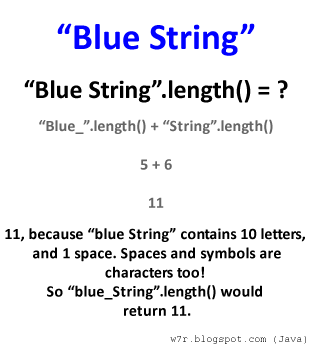
Length is a method/function used to obtain how many characters are present. These characters include spaces, punctuation, underscores, symbols in unicode, numbers and just about anything else you can think of.

For example, "iRobot" is a string that contains 6 characters, 'i', 'R', 'o', 'b', 'o', and 't'. Each character has its own index (location) in the String, in which calling "iRobot".length() will specify how many characters or spaces there are in the String.

This knowledge would be useless without an application so imagine you, a software developer, needs to ensure your clients names will fit on the screen of your newly built program. Without going through your clients one by one, you could use the length function on each one of their names in your database to find the longest name you must display. Code for this will be in example #1.

Example #1

public static void main(String[] args) {
 String[] clientNames = new String[]{
  "Jacobs", "Trout", "Semor", "Lee","Poppins",
  "Jenson", "Johnson","Peterson", "Kim", "Brown"};

 int longest = 0;

 for(String s: clientNames) {
  if(s.length()>longest) {
   longest=s.length();
  }
 }

 System.out.println("Minimum characters for display: "+longest);
}


In example #1 the length method is used to figure out which string has the most characters. It is important to realize that Strings do not have a character at someString[someString.length()] would throw an exception and terminate your program. Remember that arrays and Strings alike are indexed starting with 0.

The last character of a String can be obtained by someString[someString.length()-1].

More On Java Strings

Thursday, May 10, 2012

The Substring Method of Java

Substring is a method/function used to select smaller strings in the String it was called on.

For example, "CatDog" is a string that contains two smaller strings, "Cat" and "Dog"
To break this "CatDog" string into the two seperate strings, "Cat" and "Dog" one would use the substring method.
Example #1:
//declaration and initialization of string1
String string1 = "CatDog";
 //prints out result of substring(2) 
System.out.println(string1.substring(2));
After running the code above you it is easy to realize we have a problem. Your console should read "tDog" which means we have not split the string1 up as we had planned. The reason is because the parameter we assigned to be 2 should have been 3. Below is the code for what we truly wanted. Goes to show that print statements are a good way to test/debug your programs!
String string1 = "CatDog";    //declaration and initialization of string1
System.out.println(string1.substring(2));    //prints result of substring(2) 
The first and only parameter in example one specified the first character of the string to start the substring from and then because there was no second integer parameter the method returned that first letter and all the characters that followed it in the string.
Example #2:
String quote = "code the gnar";
String word = quote.substring(1); 
System.out.println("original value: "+quote);
System.out.println("final value: "+word);
It is important to realize that there are more than 1 ways of calling for a substring() on a string. In the following example you will see an example using the substring(int,int) syntax. See if you can figure out what the 1st and 2nd integer paremeters are doing!
Example #3:
String alphabet = "abcdefghijklmnopqrstuvwxyz";
String letters = alphabet.substring(5,0); 
System.out.println("original value: "+alphabet);
System.out.println("final value: "+letters);

Click here to see the role of the 1st integer.
Starting index for the string

Click here to see the role of the 2nd integer.
How far after starting index to span