SEARCH W7R
Friday, August 23, 2024
It's Been a While
It's been a while. A long while. And to some extent a happy detour from me writing as I have a lot more to write about these days.
I'm married, a masters in CS and Bachelors in Computer Engineering from a well known school for its technical rigor. What's more, I work in big tech and previously for financial and research companies.
Would you believe me if I told you that 50% of what I needed technically was learned in high school?
The technology landscape has changed a lot since 2010, but my desire to grow hasn't.
While I'm unsure if anyone still follows this blog, I will be putting this message out to guage.
Blogging is more saturated than it was when I started this.
But why use that as a reason to stop trying. Screw robo blogs. He I am human as ever.
Monday, November 28, 2016
Memoization in Simple Terms
w7r.blogspot.com
Memoization in real talk
Memoization is a strategy for solving a problem which requires repeated work in some manner. Instead of actually repeating the same work, we memorize it (by we I mean the running program). The program writes memos (reminders) to itself, and then before trying to perform work, it checks to see if there is a memo for the particular problem. The time spent looking at the memos is relatively small when using a special data structure known as the HashTable, but in many cases a flat array, or list of values suffices. If the memo-lookup doesn't exist for a set of parameters, then you will calculate the solution for that set of parameters and then store the result in the hashtable or list for any future calls with that same parameter set.
Why use memoization?
It can turn a recursive function from exponential runtime to something much simpler such as NlogN runtime. Big Oh of k O(k). It is important to remember that the decision of structure for holding "cached" (previously stored) results will effect the program runtime dramatically.
The Hidden Cost
The hidden cost of memoization is the space required to store all of the memos in their data structure. When space is scarce, memoization would not be a good solution.
Sunday, November 27, 2016
Free Online Encrypt/Decrypt Tool for Securing Messages
w7r.blogspot.com
There is no reason to encrypt a message without a means of restoring the message at some later time.
A Good Tool Sits in the Front of the Drawer
So today, I stumbled upon a great tool that will allow me to message friends code without the risk of it being intercepted by someone browsing their messages.
The use cases for using encryption and decryption tools are endless and often specific, but boil down to one concern: PRIVACY.
Encryption: The Scrambler
Encryption tools utilize algorithms to jumble messages into an unrecognizable form. The unrecognizable text or data is known as an encrypted message.There is no reason to encrypt a message without a means of restoring the message at some later time.
Decryption: The Descrambler
Decryption tools utilize a related algorithm to decode the encrypted message. In order for the decryption algorithm to properly restore the original message, a parameter for the algorithm, as well as which algorithm must be known. For example, you could use "Blowfish" algorithm and use they key "penguins".Where Online?
Tools4Noobs Encryption tool (The message sender will need to use this)
Tools4Noobs Decryption tool (The message receiver will need this)
HOW TO
How To Use the the Tools
- Go to the Tools4Noobs Encryption Tool and paste your original readable text in to the big box.
- Select any encryption algorithm. Making the right selection will depend on if you think the output is hard to "decipher" or interpret without the use of decryption tool.
- Enter a key to be used to unlock the message (just like a house key)
- By any means (preferably not the same way you sent the decrypted message to your friend), send your friend the decryption tool website URL ( and let them know what KEY you used, and what algorithm you used for encryption.
Practice Makes Perfect
So, here is a message I have for you using key=penguins and the algorithm=Blowfish.
3a/dG/tW/IB8ve7j2VV0vCa33sk6RW0XKB1kj8qC7OoQe6kLtJCZoIMU1c0/MoWZYvvh8H6lTqwiUWeU/n4HdzFFE6iNyTgPdviSFl8DHVKVjtRLC4gZC+ByaWyDmuj+cBT21KXAlYncsIDOx4QVffOEAA4w0N1KssVU7h4j1Khchld6Rugn1WHhoazAL2C6Y7rc67zKbL9DySDjrpyj3pInhr9gta2ThC2xnLBLyZLxgJPMytlKjgx2YXKoIw+6L3gOp7L2EmA=
Labels:
decryption,
encryption,
Free,
OnlineResource,
security
Sunday, November 20, 2016
Double Equals Vs Triple Equals (Javascript)
w7r.blogspot.com
Are == and === different in Javascript? YES THEY ARE DIFFERENT.
Alternative Syntax Exists for a Reason
The inventors and maintainers of the Javascript language did not include the triple equals to account for typing the '=' character one too many times...
Usage of Double Equals ==
The double equals, ==, is used to compare in a flexible manner. What I mean by a flexible comparison is that type-evaluation and conversion is performed before the expression returns a True or False boolean.
Usage of Triple Equals ===
The triple equals, ===, is used to compare in a strict manner. By strict, I mean that no type conversion will take place before comparing the two arguments to the expression (a === b). If the type of variable a and variable b are different, then the triple equals will return False, no matter what.
Only when the triple equals expression has two arguments, a and b, of the same type will the comparison take place, in which if the values of argument a and argument b are the same, true is returned; otherwise false is returned.
Friday, January 25, 2013
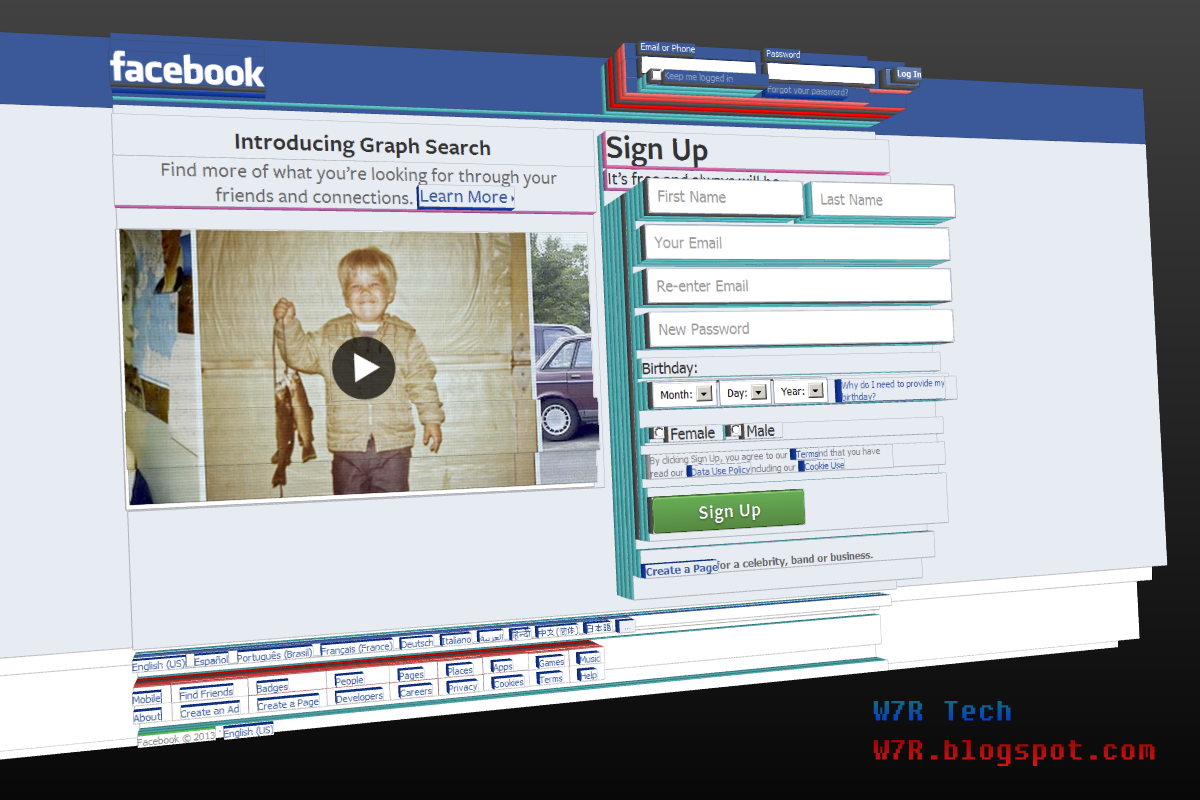
View the Web in 3D Now!
w7r.blogspot.com
Since When Did Firefox Support 3D Browsing!??
Personally, I never imagined that I would be able to view webpages in 3 dimensional space, and I am sure you did not either. The idea seems too fantastic to be true. Even now, you probably still have doubts that what I am about to tell you is true (so I wrote directions and left pictures), but you can now browse web pages in 3D through Mozilla Firefox.The directions are below!
3 Steps For 3-D Browsing
Hope for Sager/CLEVO Keyboard Users
w7r.blogspot.com
The Goal of this Post
The goal of this post is to provide a collection of resources to address, fix, and understand your Sager Laptop Keyboard and its Issues. 99% chance your keyboard problem has nothing to do with Sager or the model of the custom computer.
![]() |
| This is an example of the keyboard light problem. The middle segment of the keyboard should be teal like the right and left segments. |
Specifically, I bought the NP9150 (CLEVO P15xEMx) model laptop from AGearNotebooks for a hefty price of $2000+ (USA) with the keyboard upgrade in the of my order. The information on these keyboard problems is hard to find (trust me) so I hope this page helps you out!
List of Reported Keyboard Problems (Sager 9150)
- 'Q' key not responding to presses
- Dim segment of backlit keyboard with all or certain colors
- Shift, Fn, and Ctrl only responding to very hard presses
Solutions and Troubleshooting
Labels:
CustomLaptops,
KeyboardProblems,
Sager,
Tutorials
Monday, January 21, 2013
Regex Tutorial 3: Phone Nums
w7r.blogspot.com
Tutorial #2 Answers
- "a{3}b{4}c{5}"
- "kne{2}"
- "cab{2}age"
- "2{2}nd stre{2}t"
Typical Regex
Often times, the data we are trying to capture using Regex is not exactly clear. For example, with Regex you may want to capture all of the phone numbers on a website without knowing what actual numbers you will find.
Searching the literal text "333-333-3333" would not be a means of locating all of the phone numbers on a website. It would only capture results with that exact phone number.
So, we need to describe a pattern that follows: 3 digits + hyphen + 3 digits + hyphen + 4 digits.
Searching the literal text "333-333-3333" would not be a means of locating all of the phone numbers on a website. It would only capture results with that exact phone number.
So, we need to describe a pattern that follows: 3 digits + hyphen + 3 digits + hyphen + 4 digits.
The Digit Character
"\d" is the text to describe 1 digit. A digit character can only match: 0, 1, 2, 3, 4, 5, 6, 7, 8, 9.
So, "\d\d\d" could match the first three digits of a phone number; however, we can simplify this expression to be "\d{3}". The curly brackets surround the exact number of digits we want to target.
So far "\d{3}" matches the 1st of 5 parts in the phone number pattern we would like to describe. The part following the three digits is a hyphen "-". A hyphen is treated literally in regex because the hyphen has no other purpose in regex besides specifying ranges which appear only in the quantity specifying portion of a regular expression.
Saturday, January 19, 2013
HTML Comments
w7r.blogspot.com
Who Would Waste Their Time Commenting their HTML???
Turns out, not too many people comment their HTML code, which is a shame because it causes a hellish amount of problems for website and program developers alike. If you have never heard of a 'comment' then no need to worry. A comment is literally a.. COMMENT; however, the comment acts as notes to you and other web developers as to what the code in a specific region does.
Wednesday, January 16, 2013
Regex Tutorial 2: Repeat This, Repeat That
w7r.blogspot.com
Let's Avoid Being Redundant!
Regular Expressions can save you a lot of time, by describing complicated patterns that would be ridiculous to search documents for with a standard Search and Replace.
Repeat Operators
Tuesday, January 15, 2013
20 Goals for New Bloggers
w7r.blogspot.com
Many Blog Expectations, But Many Problems to Address
Expectations are hard to meet, so let me guide you through some realistic and important milestones.
- Listed on Google for a search term
- Being above 50th item in Google results for your blog name
- Being above 10th item in Google results for your blog name
- Get more than 1000 pageviews in one month
- Get your first user comment (that is not spam)
Monday, January 14, 2013
Regex Tutorial 1: Literal Text
w7r.blogspot.com
What is Literal Text?
Literal text is what it sounds like "literal text". Literal text is kind of a WYSIWYG method of capturing data from documents. WYSIWYG stands for What You See is What You Get.
Example #1: Literal Text
| Regular Expression Pattern | 132 |
| Document text | "abc123 321 132 1 3 2 1,32 1321321221" |
| Findings | "abc123 321 132 1 3 2 1,32 1321321221" |
| Caught text | "132", "132", "132" |
Importance of Literal Text
20 Resources to Learn Regex
w7r.blogspot.com
The order of the resources is insignificant. These are all great resources for learning Regular Expressions (Regex). All of these resources have been added to the web Resources page under the Regex category.
Wednesday, December 19, 2012
Python 3.2 Tutorial 1: Hello World!
w7r.blogspot.com
Python 3.2 Tutorial #1: Hello World!
Tutorial 1 contents: Code, and explanation for HelloWorld.py followed by useful information about Python in general.
# HelloWorld.py
# Python 3.2 Tutorial Part 1
# w7r.blogspot.com
# Brian R. H.
# the main method/function
def main():
print("Hello World!")
# Call to main function
main()
How to Run HelloWorld.py on Your Computer!
Tuesday, December 18, 2012
Holiday Headache Relief
w7r.blogspot.com
Calm down. It's the holidays! Be greatful for what you have and do not fight for the material possessions in stores like the general public! Perhaps, gracefully shopping online is a better option. Here are a handful of sites that can alleviate your holiday headache.
Seasons Greeting, eCards!
Popular Online Stores
This post will be undergoing frequent modification until Christmas Eve 2012.
Sunday, September 30, 2012
Java "Hello World" Program
w7r.blogspot.com
Traditionally, "Hello world" is the first program created in any programming language by new users to ensure they are able to compile and run their program in the given language. So I thought it'd be a good idea to post up the code for HelloWorld.java on the site for java beginners.
public static void main(String[] args){
System.out.println("Hello, World!");
}
Breaking Down The Code
- System.out.println(string)
- This statement (or line of Java code) informs the System to print the string (or text referred to by the variable, string) to the console (where output is displayed).
- "Hello, World!"
- is a string literal. String literals are text that are actually written and displayed exactly as the programmer wrote them. You could replace the text inside the quotation marks with anything you would like to be outputted to the console.
Sunday, July 08, 2012
Android/Eclipse Programming Solution "Failed to convert @drawable/image.png into a drawable"
w7r.blogspot.com
While trying to set up an xml reference to an image file I placed in drawable-hdpi folder, the following error occured: EclipseFailed to convert @drawable/image.png into a drawable.
Chances are that you are reading this because you too ran into the same problem. Luckily, I've got your solution!
All you need to do is change the xml reference from "someimage.png" or "someimage.jpg" to "someimage". So simply, eliminate the file extension for whatever resource it was and the error should dissapear.
Labels:
Android-Eclipse,
AndroidDev,
EclipseErrors,
XML
Saturday, July 07, 2012
How to Rename Multiple Files in Windows 7
w7r.blogspot.com
About this Tutorial
This tutorial will show you how to rename a set of images to the same name with a number representing their original order. This is also called batch renaming.
A Few Simple Steps
- Find and highlight the files you wish to rename
- Right click any of the highlighted files from the group. Then, select "rename".
- Type a new name that the group of files will share, such as "Zoo Photos"
- Click or press "Enter" once you have the desired group name for your files.
An Example
Start: 42124.jpg, 42125.jpg, 42126.jpg, 42127.jpg
Rename input: "Vacation"
End: Vacation (1).jpg, Vacation (2).jpg, Vacation (3).jpg, Vacation (4).jpg
Rename input: "Vacation"
End: Vacation (1).jpg, Vacation (2).jpg, Vacation (3).jpg, Vacation (4).jpg
Quick Tip:
If you want to select all files in a folder to group rename, simply press Ctrl and A simultaneously.
Labels:
BatchOperations,
Files,
Win7,
Win7Tutorials,
Windows,
WinVista
Thursday, July 05, 2012
Turn Links into Buttons with CSS
CSS Tags Decorate Stuff!
Using CSS you can turn dull links into attractive buttons. Let me show you how!
By using CSS I am able to decorate the anchor tag! Before CSS buttons on websites were text in images between the anchor tags.
THIS WAS BAD. Loading images takes a significant amount of time, much more than the average visitor was willing to spend watching the page load. CSS is a way of decorating text based on selectors and classes which describe the style needed.
Thanks to CSS you don't have to compromise looks for speed. Take a look at some more examples of how CSS can decorate links to appear as buttons.
THIS WAS BAD. Loading images takes a significant amount of time, much more than the average visitor was willing to spend watching the page load. CSS is a way of decorating text based on selectors and classes which describe the style needed.
Thanks to CSS you don't have to compromise looks for speed. Take a look at some more examples of how CSS can decorate links to appear as buttons.
Don't Have the Time to learn CSS?
Although learning CSS would be ideal, there are many programs and websites that host programs to help you create buttons visually. The CSS for the buttons will be printed out to you once you reached a design you like! Try a CSS button creator now!
The Parts of a CSS Button
- a:link - How non-visited links would appear.
- a:visited - How visited links would appear.
- a:hover - How links appear while the mouse hovers over them.
- a:active - How links appear while they are clicking.
Tuesday, July 03, 2012
Java GUI Tutorials Archive
All You Need in One Location
Bookmark this resource before you forget too! This useful post contains a link to every Java GUI tutorial post on W7R Tech. Even if you have completed all of the W7R Java GUI tutorials, you can use this post refresh and expand your understanding of Java GUIs. Enjoy!
Don't forget to bookmark this resource! And make sure to subscribe to W7R Tech!
Labels:
Archives,
GUI,
Java,
JavaGraphics,
JavaSwing,
JavaTutorials,
Tutorials